The Today View is a live, visual representation of what’s happening on your website right now. Instead of numbers in a table, you see your visitors as animated astronauts or aliens exploring a galaxy.
What Today View Is (and Isn’t)
Today View is designed to be fun and engaging. A quick pulse check of your site’s live activity. It works for both low-traffic and high-traffic sites. It’s not intended as a deep analytics tool; for detailed analysis, use the full Web Analytics dashboard, Recordings, or Snapshots.
How to Access Today View
In Crazy Egg, go to Web Analytics and select Today from the date picker in the top right. The visualization will load automatically and begin showing your current visitors.
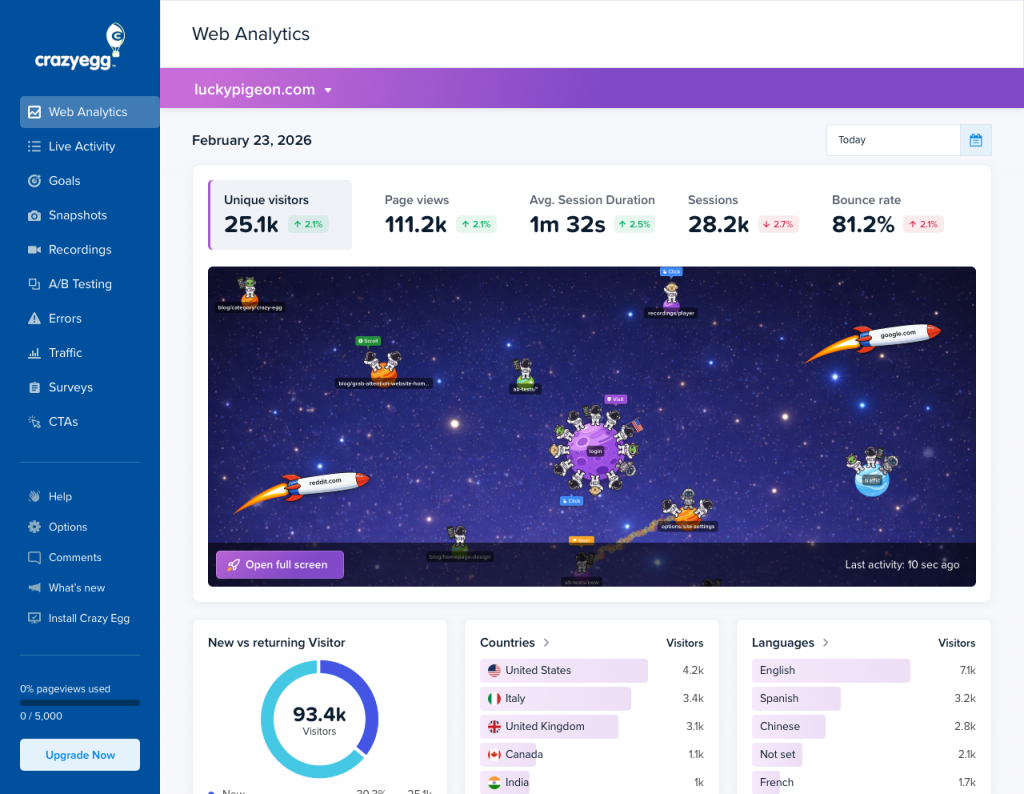
What You’re Seeing
Each character represents a real visitor currently on your site. Here’s what their behavior tells you:
Visitor details (demographics)
- How they arrived — Visitors from a referral source (Google, Reddit, etc.) ride in on a rocket labelled with that source. Direct visitors fly in on their own.
- Country — Shown by the flag they plant when they land.
- Device — Visitors on mobile devices hold phones.
What they’re doing (activity)
- Current page — Character is on a “planet” representing the page they’re viewing. When they navigate, they fly to a new planet.
- Scrolling — Character looks side to side when scrolling.
- Clicking — Character jumps when they click.
- Conversion — Character throws confetti when they trigger a goal conversion.
- Rage click — Character turns red when a rage click is detected.
- JavaScript Error — Character’s eye turns into X when an error is detected.
- Survey — Character holds a clipboard when a survey is filled out.
Clicking on a Visitor
Click any character to open their detail panel. This shows:
- Demographics — Country, device, OS, browser, language, referrer, and current page
- Event Log — A full chronological list of everything that the visitor has done: page visits, scrolls, clicks, goal completions, rage clicks, errors, survey responses, and revenue events.
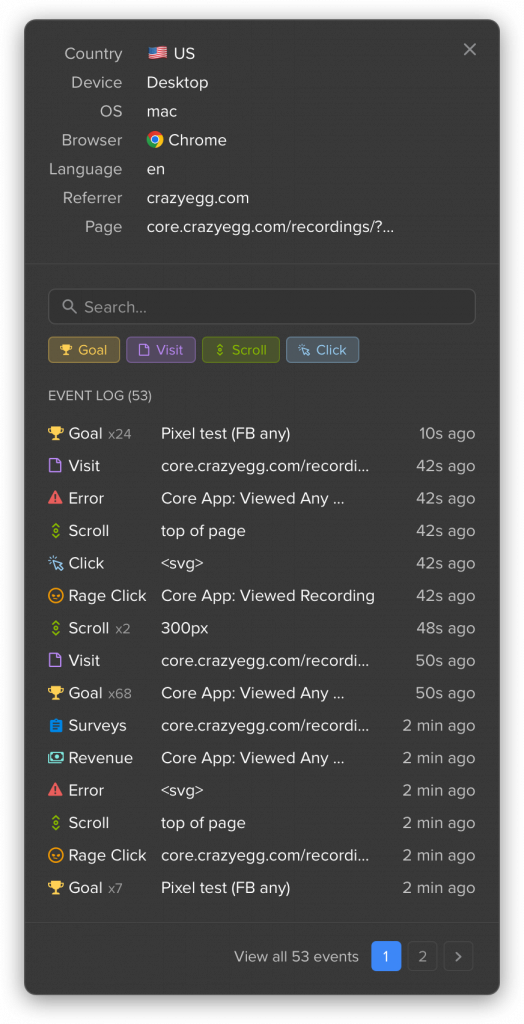
You can filter the event log by type using the Goal, Visit, Scroll, and Click buttons at the top. Use the search bar to find specific events, and page through the full log with the pagination at the bottom.
A Note on Data Timing
When Today View first loads, it shows activity from the last 10 minutes. As you watch, new events accumulate in real time. A visitor remains visible as long as they’re active on your site; they’ll disappear if they leave or are inactive for 10+ minutes.