Question
Hi,
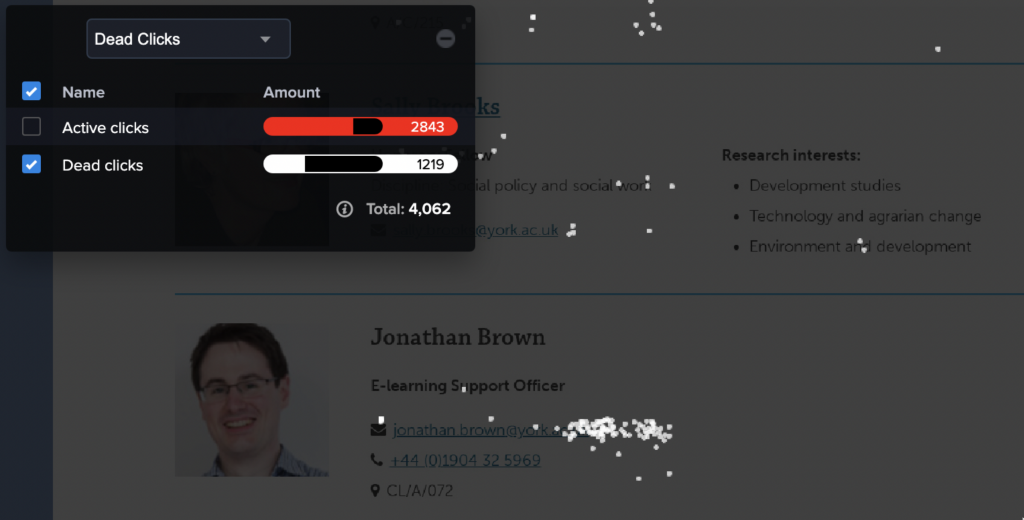
I have a Heatmap running on a page -https://www.york.ac.uk/business-society/people/- which contains interactive filters that allow users to filter a list of items. In the heatmap/confetti report, I see many clicks recorded as dead clicks, but where they appear doesn’t seem logical – for example, as shown in the screenshot attached, over some blank space to the right of an actual link. Only one click was registered as active, with all the others showing as dead and to the right of an email address link.
Are pages with interactive filters like this problematic for CrazyEgg to track? I couldn’t find anything mentioned in the support pages, but I was wondering if the clicks I’m seeing recorded as dead clicks could be explained by them not registering at the correct location.
Answer
When you see patterns like this, I recommend checking the Overlay report to see which element it has been attributed to. Typically, when I see this kind of thing, I immediately know that div or paragraph tags are being used. I look at those as containers. Within the container are the actual link and typically other elements like the mail icon.
Our system occasionally misinterprets a click as a dead-space click because the elements’ attributes have changed. But in these cases where containers are used, your visitors may be missing an opportunity. In this case, the opportunity to email Jonathan Brown.
The 94 clicks were attributed to this element (see the screenshot below). Notice how this element expands beyond the email link. Also, notice how in the code to the right, you have two sub-elements, the link and the mail icon. I would group all of the elements.

While it is hard to know how many emails Jonathan Brown received during the time this Heatmap has been tracking, that is where I would start. The thing to keep in mind is that people may still have decided not to send an email. So while he may have received 95 emails from this page, it could have been fewer. An excellent way to confirm whether emails were received from this page by those listed would be to add a subject line.
Another way to approach this would be to ensure the link is not separate. Add the link tag about the mail icon and remove the <p> tag. HTML tags do not always need to be inside a p tag. ‘P’ is for ‘paragraph,’ so if you want a link, icon, etc., inside a text paragraph, those tags will go inside the p tag.