Crazy Egg Tracking vs. GA4 Integration
Crazy Egg’s Web Analytics dashboard can use two data sources:
- Crazy Egg Tracking Script
- Google Analytics 4 (GA4) Integration
Both power traffic metrics inside Web Analytics, but they rely on different collection and processing methods. As a result, totals may differ.
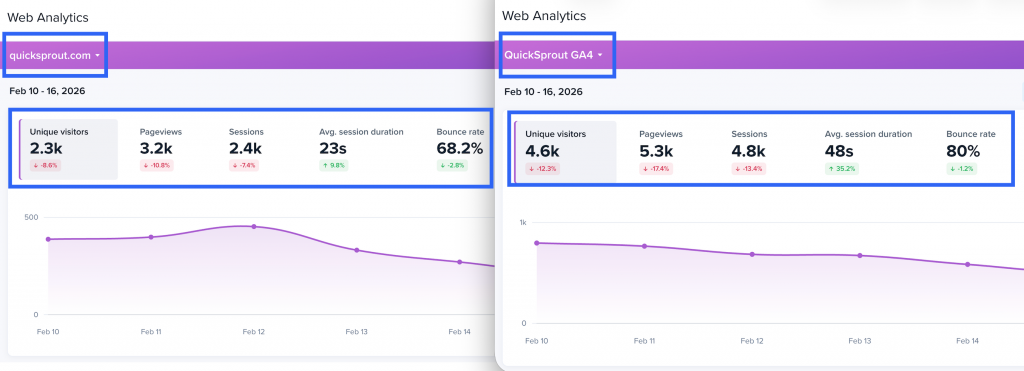
Crazy Egg Tracking Script
When installed, the Crazy Egg script collects session and page-level data directly from your site.
How it works
- JavaScript runs client-side when a page loads.
- Sessions are created using Crazy Egg session logic.
- Known bot traffic is filtered automatically.
- Data is processed within Crazy Egg systems.
Sampling (Crazy Egg Web Analytics)
Crazy Egg aims to process up to 1,000 sessions per day per site for Web Analytics.
- If your site receives fewer than 1,000 sessions per day, we will most likely track every session (100% sampling rate).
- If traffic is expected to exceed 1,000 sessions, sampling is applied once we are able to estimate the projected daily volume.
Sampling is proportional to projected traffic. For example:
- If a site is expected to receive 2,000 sessions per day, Crazy Egg will track approximately every other session (50% sampling rate).
- If a site is expected to receive 4,000 sessions per day, the sampling rate adjusts accordingly.
Sampling remains consistent based on the estimated daily traffic volume.
GA4 Integration (Imported Data)
When you connect a GA4 property, Crazy Egg imports traffic metrics from GA4 into Web Analytics.
How it works
- You authenticate and connect a GA4 property.
- Traffic metrics are imported from GA4.
- Reporting reflects GA4’s processed dataset.
GA4 import affects Web Analytics traffic metrics only. It does not replace the Crazy Egg tracking script.
Why Crazy Egg and GA4 May Differ
Even when both are correctly installed, differences are expected.
Sampling Differences
- Crazy Egg samples Web Analytics data when traffic exceeds the 1,000 sessions/day target.
- GA4 may apply sampling in certain reports depending on query size and configuration.
Consent Mode & Data Modeling (GA4 Only)
GA4 may apply behavioral modeling when users decline cookies.
Google documentation:
https://support.google.com/analytics/answer/11161109
If Consent Mode is enabled:
- GA4 estimates sessions and conversions for users who did not grant consent.
- Crazy Egg does not model declined-consent traffic.
This can cause GA4 totals to differ from Crazy Egg tracking.
Installation & Coverage Differences
Traffic discrepancies may result from:
- Scripts not installed on all templates
- Subdomain differences
- Checkout pages blocking third-party scripts
- GTM configuration differences
Ad Blockers & Script Blocking
Both tools rely on browser execution.
Ad blockers, privacy extensions, or corporate firewalls may block one script but not the other.
Bot Filtering
- Crazy Egg filters known bot traffic automatically.
- GA4 applies Google’s bot filtering mechanisms.
Filtering systems differ between platforms.